
Index Settings – General Attributes
The Index Settings page manages the configuration for a specific search index (e.g., demo.searchjetengine.com). The tabs at the top of the page allow navigation between various configuration types: General Attributes, Stop Words, Synonyms, Ranking Rules, and Data Management.
The General Attributes tab, which is selected by default, is divided into two primary sections for managing the fields (attributes) within your search index: Filterable Attributes and Sortable Attributes.
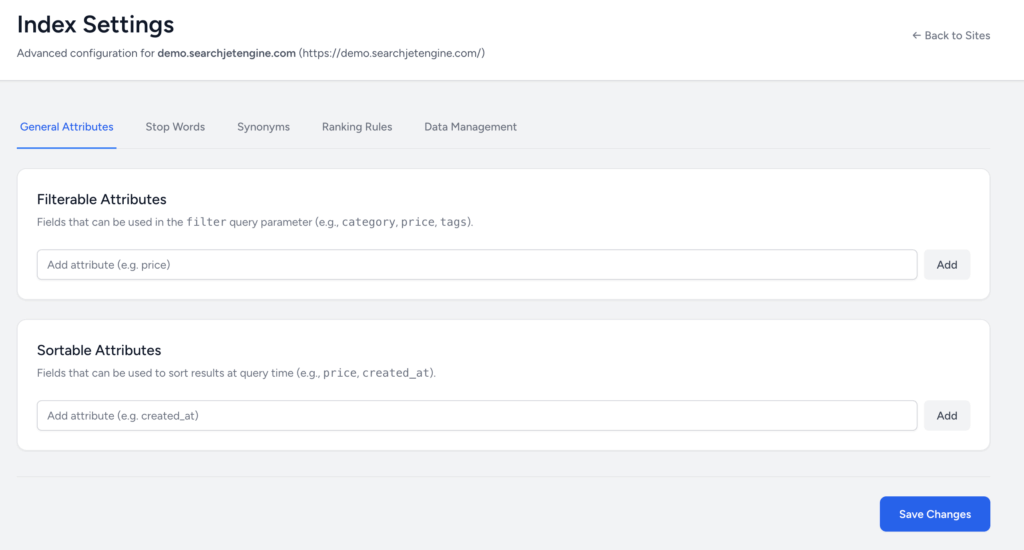
1. Filterable Attributes
Purpose: This section defines which fields in your data can be used by end-users to narrow down or refine search results.
| Field Name | Description | Example Usage |
| Filterable Attributes | Fields that can be used in the filter query parameter. | If you add price, users can filter results to only show items under $50. Other examples include category and tags. |
How to Add a Filterable Attribute:
- Locate the input field under the “Filterable Attributes” section.
- Type the exact name of the data field you want to make filterable (e.g.,
brand). - Click the Add button next to the input field.
2. Sortable Attributes
Purpose: This section defines which fields in your data can be used to re-order the search results based on specific criteria chosen by the user.
| Field Name | Description | Example Usage |
| Sortable Attributes | Fields that can be used to sort results at query time. | If you add price, users can sort results from lowest to highest price. Other examples include created_at (for date added) and popularity. |
How to Add a Sortable Attribute:
- Locate the input field under the “Sortable Attributes” section.
- Type the exact name of the data field you want to make sortable (e.g.,
rating). - Click the Add button next to the input field.
Saving Changes
After modifying the Filterable Attributes or Sortable Attributes, you must click the Save Changes button located at the bottom-right of the page to apply your new configuration to the search index.